
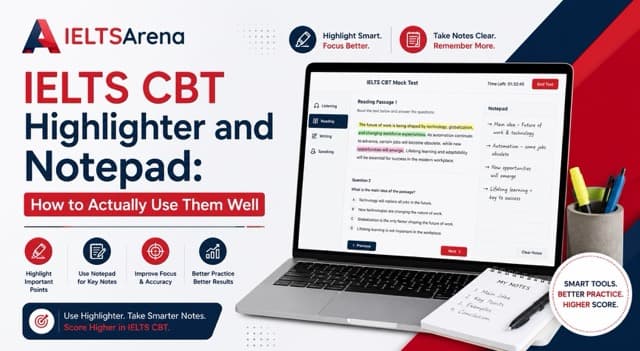
The IELTS CBT highlighter and notepad are two tools that exist only in the computer-delivered exam, never on paper, and most candidates spend zero minutes practicing either before test day. Both are genuine advantages once you know how to use them well. Both can also cost you time if exam day is the first moment you touch them.
Since paper-based IELTS ended worldwide on 27 June 2026, nearly every candidate now sits an exam that includes these tools, which makes a few minutes of deliberate IELTS CBT highlighter and notepad practice one of the highest-value things you can do in the final weeks before your test.
What the Highlighter Actually Does
The on-screen highlighter lets you select and mark text directly within Reading passages and question prompts, the same way you might underline a printed passage with a pen, except the marks are digital and instantly removable. Used well, it helps you track key terms, locate answers faster on a second pass, and reduce the mental load of holding information while you search for it elsewhere on the page.
Used poorly, or not at all, candidates either miss it entirely and re-read passages from scratch each time, or over-highlight so much of the text that the tool stops being useful for narrowing focus.
Advertisement
What the Notepad Actually Does
The digital notepad is available across sections and gives you a persistent space to jot working notes, whether that is tracking Listening details as audio plays, planning a Writing Task 2 structure before you start typing, or noting a Reading answer candidate before committing it to the actual answer field. It functions similarly to scrap paper, but it exists only on screen and needs a few minutes of familiarity to use efficiently under time pressure.
Why IELTS CBT Highlighter and Notepad Practice Gets Skipped, and Costs More Than It Should
These tools are small enough that most preparation guides skip them entirely in favor of content strategy, band criteria, and vocabulary building. That is a reasonable instinct, since content knowledge matters more overall. But the highlighter and notepad are also the parts of CBT preparation candidates are most likely to have never touched before exam day, since no amount of general English study introduces them. A five-minute walkthrough closes a gap that otherwise gets discovered live, during the exam that counts, which is exactly why this small pocket of preparation punches so far above its actual time cost.
A Realistic Student Story
Sunita, an IT professional in Kathmandu preparing for a New Zealand skilled migrant visa, had completed extensive content preparation before her first CBT attempt but had never specifically practiced the highlighter or notepad, assuming they would be self-explanatory.
"I lost real time in Reading trying to figure out how highlighting worked while the clock was running," she said. "In Listening, I did not use the notepad efficiently at all, because I had never practiced tracking details on it before."
She scored Band 6.0 on that attempt. Before retaking the exam, she spent two short sessions specifically practicing both tools, nothing else, using timed reading passages and listening audio. Her second attempt reached Band 7.0, with both Reading and Listening improving by half a band each.
Two short sessions with two specific tools closed a gap that months of general content review had not touched.
Want to see how comfortable you already are with both tools? Take a free CBT mock test on IELTSArena and find out before exam day does.
How to Practice IELTS CBT Highlighter and Notepad Skills Together
Use the highlighter to mark key nouns, dates, names, and qualifying words like "only," "mainly," or "except," rather than long stretches of text. In True/False/Not Given and Matching Headings questions specifically, highlighting the exact phrase that supports or contradicts a statement makes your second pass through the passage significantly faster. Avoid highlighting so much that the tool stops distinguishing important text from everything else.
For the notepad, use short, abbreviated notes rather than full sentences in Listening, since audio does not pause for you to write. In Writing, use it to sketch your Task 2 structure, thesis, and main points, before you start typing your actual response, the same way you might plan on scrap paper. In Reading, jot a tentative answer before committing it, especially for questions you are not fully certain about, so you can revisit it quickly using the navigation panel. Deliberate IELTS CBT highlighter and notepad practice, even just ten minutes a day for a week, is usually enough to make both tools feel automatic rather than something you are still figuring out mid-exam.
Where IELTSArena Fits
These tools are not available on paper, and they represent genuine advantages for candidates who know how to use them. IELTSArena's simulation platform includes both the on-screen highlighter and digital notepad exactly as they appear in the real exam, so your IELTS CBT highlighter and notepad practice happens under authentic conditions rather than guesswork, well before test day.
A free mock test lets you practice using both tools across all four skills, with instant band scoring and feedback that shows whether format familiarity, not English ability, is the gap holding your score back.
A Few Quick Checks Before You Assume You Are Ready
- Have you ever used an on-screen highlighter before, even briefly?
- Do you know how to open and use the digital notepad during a Listening section without losing track of the audio?
- Have you practiced planning a Writing Task 2 response using the notepad rather than on paper?
If several of these are unfamiliar, that is a fast, specific fix, not a deeper preparation problem, and it is exactly what focused IELTS CBT highlighter and notepad practice is designed to solve.
Practice Both Tools Before Exam Day
Five minutes with the actual highlighter and notepad now is worth more than discovering them live during your real exam.
Start a Free Mock Test on IELTSArena →
Frequently Asked Questions
How does the IELTS CBT highlighter actually work?
The on-screen highlighter lets you select text within Reading passages and questions and mark it digitally, similar to underlining on paper but instantly removable. It is available only in the computer-delivered format and works best when used to mark key terms and qualifying words rather than large blocks of text.
What should I write in the IELTS digital notepad?
Short, abbreviated notes work best, key details during Listening audio, a quick structure outline before starting a Writing Task 2 response, or tentative answers in Reading before committing them. Full sentences usually cost more time than they save under exam conditions.
Do the highlighter and notepad actually help improve my score?
Indirectly, yes. Neither tool is scored directly, but using them well saves time and reduces cognitive load, which supports better accuracy and pacing across Reading, Listening, and Writing, the sections where they are available.
How do I practice using IELTS on-screen tools before the exam?
Practice on a genuine CBT simulation platform that includes the real highlighter and notepad, not a paper-style quiz. IELTSArena's free mock test includes both tools exactly as they appear in the actual exam, so you can build familiarity before test day.
Are the highlighter and notepad available in every section of the exam?
The highlighter is primarily used in Reading. The digital notepad is available more broadly, including during Listening and Writing, giving you a consistent space for working notes across most of the computer-delivered test.
![Best IELTS Software for Institutes [2026]: The 4-Path Buying Decision Nobody Explains](/_next/image?url=%2Fblog%2Fcover-best-ielts-software-for-institutes.jpeg&w=3840&q=75&dpl=dpl_5NJXR43SHSCSjK3RzH46REnQw6SC)